Gamer Guides Interactive Maps Now Support User Submitted Markers
 Sophia Hayes
- 18 Jan 2026, 14:06 UTC
- 0 comments
Today’s a big day for us at Gamer Guides - User Submitted Map Markers are officially live!
Our interactive maps have always been about making games easier to explore, 100%, and enjoy. But the truth is - the best discoveries often come from the community. Players find the hidden stuff first. The weird edge cases. The “how did anyone notice this?” moments.
So we built a way for you to contribute those finds directly to our maps - quickly, accurately, and without needing to wrestle with messy forms or long item names.
This feature took a lot of work behind the scenes (more than it probably looks like on the surface!), and we’re genuinely excited to finally put it in your hands.
What are User Submitted Map Markers?
User Submitted Map Markers let you add your own discoveries to Gamer Guides maps - things like items, collectibles, secrets, points of interest, or anything a map category supports.
If you’ve ever thought:
- “This map is missing one more chest…”
- “There’s a hidden thing here that nobody’s marked yet…”
- “I wish I could quickly share this spot with other players…”
…this is for you.
Making submissions quick and easy
We didn’t want this to be a basic “type a name into a box” system. We’ve focused on making submissions simple and accurate by connecting them to the Gamer Guides item database and our staff-created marker categories - so you can pick the right thing quickly, and maps stay tidy for everyone.
Smart item search (no typing everything out)
When you add a marker, you can search for the exact item and select it from our database - so you don’t need to guess spellings, naming conventions, or whether something is called “Ancient Key” vs “Old Key” vs “Rusty Key”.
You start typing - we do the heavy lifting - you pick the right result.

Smart search + item select
Staff-created categories (so maps stay tidy)
Instead of everyone inventing their own marker types, submissions use existing map categories created by our team.
That means:
- cleaner maps
- better filtering
- fewer duplicates
- easier browsing for everyone
How it works (step-by-step)
Submitting a marker is designed to be simple:
- Open a map and choose to submit a marker
- Place the marker where it belongs
- Choose a category (from our staff-defined marker categories)
- Search and select the item (when the category supports it)
- Add any optional notes (if available)
- (Optional but highly recommended) Add a screenshot of the item in-game
- Hit submit
And yes - it works on desktop and mobile, so you can submit whether you’re at your PC or checking something quickly on your phone.
Why screenshots help (and why we recommend them)
You can also include a screenshot of the item you’re submitting - and we highly encourage it.
A screenshot helps us:
- verify the location and authenticity of the submission
- approve your marker faster and more confidently
In short: submissions with screenshots are much more likely to be approved.
What happens after you submit?
This part is important, so expectations are clear.
When you submit a marker, it is automatically added to our submission queue for review and approval.
While it’s waiting for approval:
- The marker will only be visible to you on the map
- Nobody else will see it yet
Once it’s approved:
- It becomes visible to everyone on the map
- You’ll receive:
- a short email
- and an onsite notification
letting you know your marker has been approved
This helps us keep maps accurate, prevent duplicates, and maintain consistent quality - while still making it fast and satisfying to contribute.

A submitted marker in action (Pikachu marker popup example).
You’ll be credited for your contributions
We want this to feel like a true community feature - because it is.
As you contribute, we’ll highlight community involvement directly in the map experience, including contributor credit on the map list page.

Map list page showing contributors + contribution counts.
We’d love your feedback
We’re really proud of this feature - and we’re also very aware that features like this get better with real-world use.
So please tell us what you think:
- Is the submission flow fast enough?
- Is item search returning what you expect?
- Are there categories you’d love us to add?
- Anything confusing or missing?
Your feedback will directly shape how we improve this system next.
Try it now
User Submitted Map Markers are now available on supported Gamer Guides maps.
Thanks for helping us build maps that are more complete, more accurate, and more useful for everyone. We really hope you enjoy using this feature - and if you want to explore more of our interactive maps, you can find the full list here:
Latest updates
Introducing Our New Review Score Guidelines & “Outstanding” Category
3 February, 2026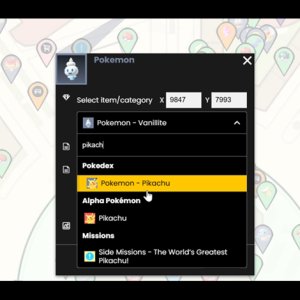
Gamer Guides Interactive Maps Now Support User Submitted Markers
18 January, 2026Gamer Guides Updates - March 2025: New Themes, Improved Search, and Map Layers
25 January, 2026About us
Founded in 2011, Gamer Guides is one of the longest-running, entirely female-led, independent game knowledge specialists in the gaming media industry. Their work encompasses interactive, thorough, and detailed game resources, including complete guides, walkthroughs, stunning interactive maps, and comprehensive databases. These are all created by a team of industry veterans with a profound love and appreciation for gaming in its most foundational and purest form. Their reviews and previews reflect this focus, aiming to critique games on a highly analytical and in-depth level.
 Subscribe NOW!
 Join NOW!